How to Prove You Didn't Use AI: What Google Docs Version History Actually Proves (and What It Doesn't)
Flagged as AI? Version history screenshots are weaker evidence than the tutorials imply. What the detectors’ own numbers say, where the manual methods break, and what a signed writing record can — and cannot — show.
A student writes a 2,000-word essay over four evenings, submits it, and gets an email three days later saying it was flagged as 98% AI-generated. There is no appeal process worth the name. The burden of proof has quietly inverted: the accusation arrives with a number attached, and the defense arrives with "I promise I wrote it." Most people in that position start Googling some version of how to prove I didn't use AI, and what they find is a handful of content-farm listicles, a law firm's generic advice page, and a tutorial on opening Google Docs version history.
Full disclosure before we go further: this is Know Nota's blog, and we build a tool for exactly this problem. We'll get to it. But the first two-thirds of this article is about why the existing methods are weaker than people think, because if you're about to stake your academic standing on a version history screenshot, you should understand what that screenshot can and cannot support.
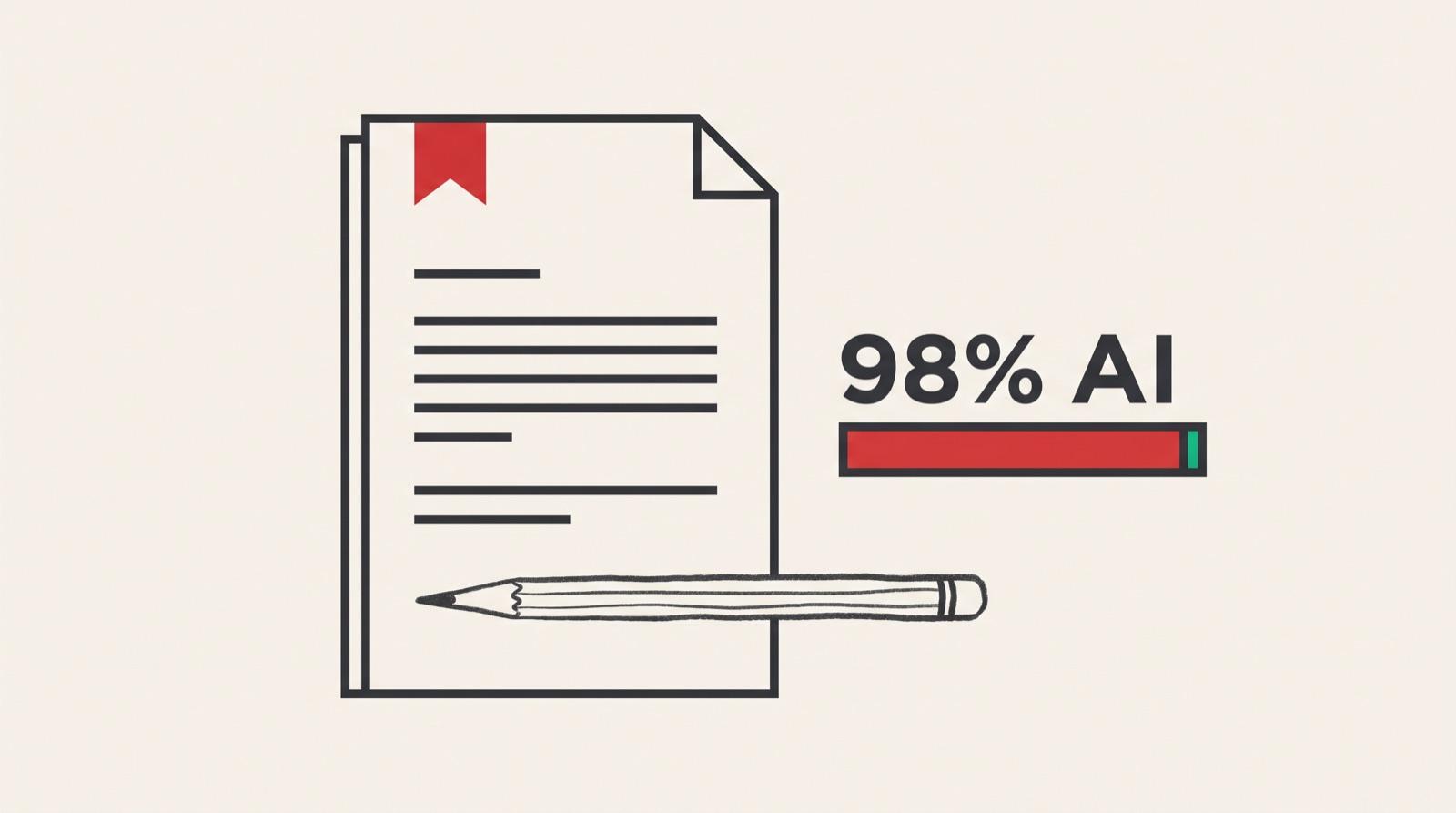
The accusation is more fragile than the accused realizes
Start with the detectors themselves, because their weaknesses are documented and citable, and citing them is the first move in any serious defense.
In 2023, a Stanford research team published GPT Detectors Are Biased Against Non-Native English Writers (Liang et al.). They ran seven widely used detectors against TOEFL essays written by non-native English speakers and against essays by US eighth-graders. The detectors classified more than half of the TOEFL essays as AI-generated. The eighth-grade essays were mostly classified correctly. The mechanism is unglamorous: detectors lean on measures like text perplexity, and writing with a narrower vocabulary and more conventional sentence construction scores as "too predictable" — which is also what second-language writing often looks like.
OpenAI, which had the strongest possible commercial incentive to make detection work, shut down its own AI Text Classifier in July 2023, citing low accuracy. Its published performance before shutdown: it correctly identified 26% of AI-written text as "likely AI," and misclassified 9% of human-written text as AI. That is the company that made the model.
Turnitin has been more careful than most, and its own disclosures are instructive. When it launched AI detection in April 2023, it stated a false positive rate under 1% at the document level — then later acknowledged that at the sentence level the figure was closer to 4%, and that documents with less than 20% flagged AI writing carry a higher risk of false positives. Vanderbilt University's Center for Teaching disabled the Turnitin AI detector for its instructors in August 2023, publishing its reasoning: with roughly 75,000 papers submitted in the prior year, even a 1% false positive rate implies around 750 papers wrongly flagged.
And an independent evaluation, Weber-Wulff et al., Testing of Detection Tools for AI-Generated Text (International Journal for Educational Integrity, 2023), tested 14 tools and concluded that none were accurate or reliable enough to be used as the basis for academic integrity decisions — particularly after light paraphrasing or machine translation.
None of this means AI misuse isn't happening. It obviously is. It means the instrument producing the accusation has a known, published error rate, and that the accused has a legitimate right to ask for something better than a percentage.
The three manual methods people rely on, and where each one breaks
Search for Google Docs version history proof and you'll get a competent tutorial on File → Version history → See version history. It's real advice. It's just weaker evidence than the tutorials imply, and it's worth being precise about why.
1. Google Docs version history
What it does well: it shows named revisions with timestamps, it's automatic, and it can demonstrate that a document grew over multiple sessions rather than appearing in one block. For a lot of informal disputes, that's genuinely persuasive. A professor looking at a doc that expanded from 200 words on Tuesday to 1,900 words across Thursday and Sunday will often accept it and move on.
Where it breaks:
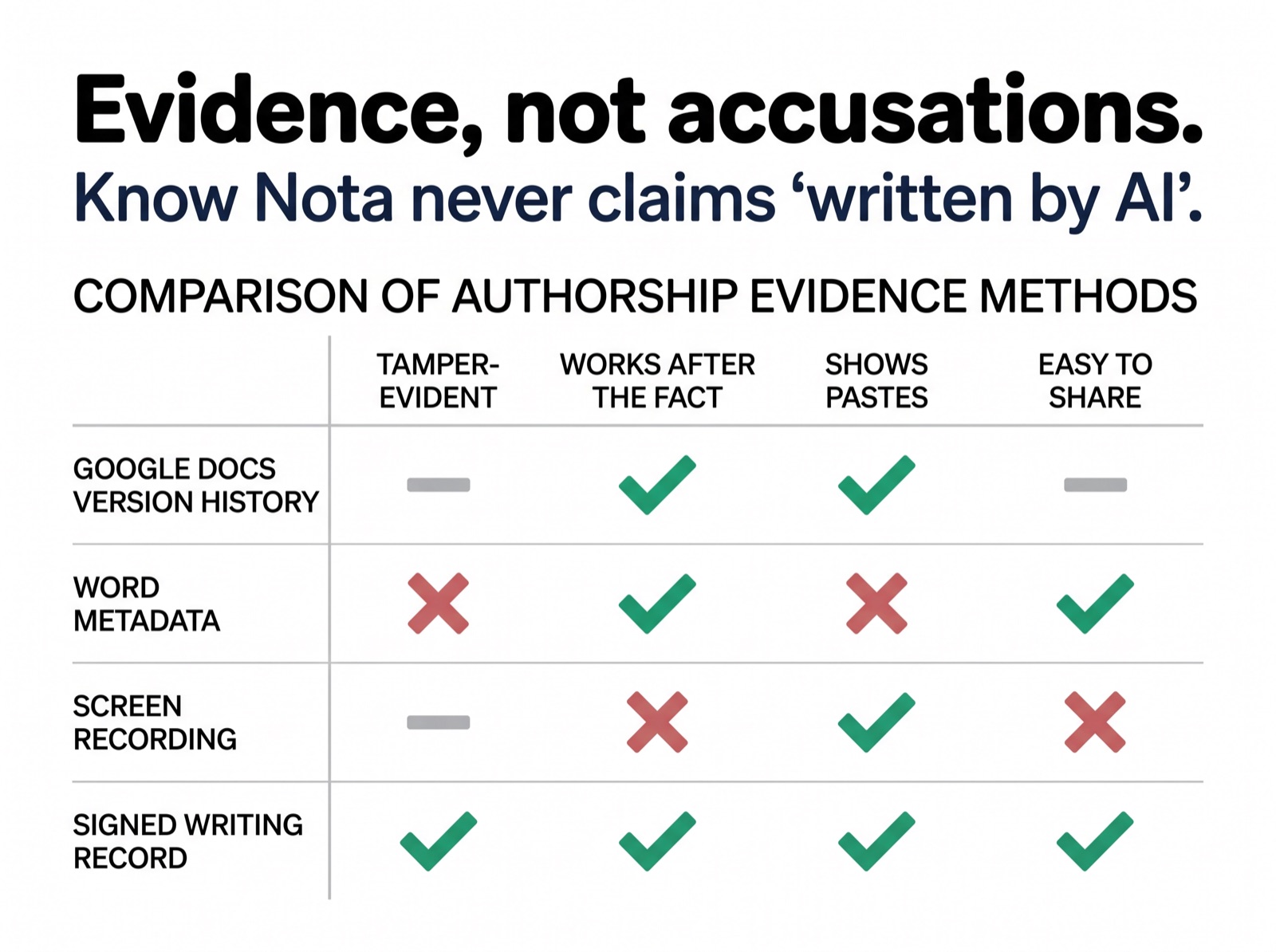
- It's editable and deletable. Version history lives in your own account. You can delete named versions, and a copied document starts a fresh history. Anyone who understands this — including a skeptical administrator — knows the record is under the control of the person presenting it.
- Granularity is coarse and inconsistent. Google collapses edits into revision blocks on its own schedule. A block can cover a long stretch of work, which means it often can't distinguish "typed 600 words over 40 minutes" from "pasted 600 words, then edited for 40 minutes."
- It says nothing about where text came from. A paste from your own earlier notes and a paste from a chatbot look identical in version history.
That last point is the important one. Version history is a record of changes to a file. It was never designed as a record of how writing happened, and the gap between those two things is exactly where AI disputes live.
2. Word revision tracking and file metadata
Microsoft Word's Track Changes and document properties (total editing time, revision number, author) get suggested a lot. The problem is that editing time in Word counts time the document was open, not time spent writing, and it resets or distorts in ordinary ways — opening a file on a second device, saving a copy, converting formats. Metadata fields are also directly editable. As evidence, it's soft in both directions: it can undercount honest work and it can be adjusted by anyone who wants to.
3. Screen recording yourself writing
This is the most rigorous manual option and the one people almost never actually do. It produces genuinely strong evidence — hours of continuous footage of a document being composed. It also has three fatal practical problems: it generates enormous files nobody wants to watch, it requires you to have predicted the accusation before you wrote the paper, and it does nothing for the essay you submitted last month.
Which is the common thread across all three. Every manual method fails in the same place: it is either retroactively unavailable, unilaterally editable, or silent on the question actually being asked.
What defensible evidence of authorship actually requires
If you strip the problem down, useful proof of authorship writing evidence needs four properties. This is the standard worth holding any solution to, including ours.
Process, not just outcome. The dispute is never about the final text — both sides have that. It's about how the text came into existence. Evidence has to describe the writing process: when sessions happened, how long they ran, how text accumulated, where it was revised and rewritten.
Timestamp integrity. Timestamps that the presenter can edit are close to worthless in a contested setting. The record needs to be created and signed by a system that isn't the accused person's word processor, so that "these sessions happened at these times" is a claim the record itself can support.
Tamper-evidence. Not tamper-proof — nothing is. Tamper-evident, in the same sense a digital signature works: if the record is altered after creation, verification fails visibly. That distinction matters because it shifts the conversation from "do I trust this student" to "does this record verify."
Verifiability by the other side. Evidence a professor has to take on faith isn't evidence. They need to be able to open something independently and confirm it's authentic without installing software, creating an account, or trusting a screenshot.
Google Docs version history satisfies roughly one and a half of these four. That's the gap.
Know Nota's signed writing record
We built Know Nota's writing record to meet that four-part standard, and it's worth being exact about what it produces.
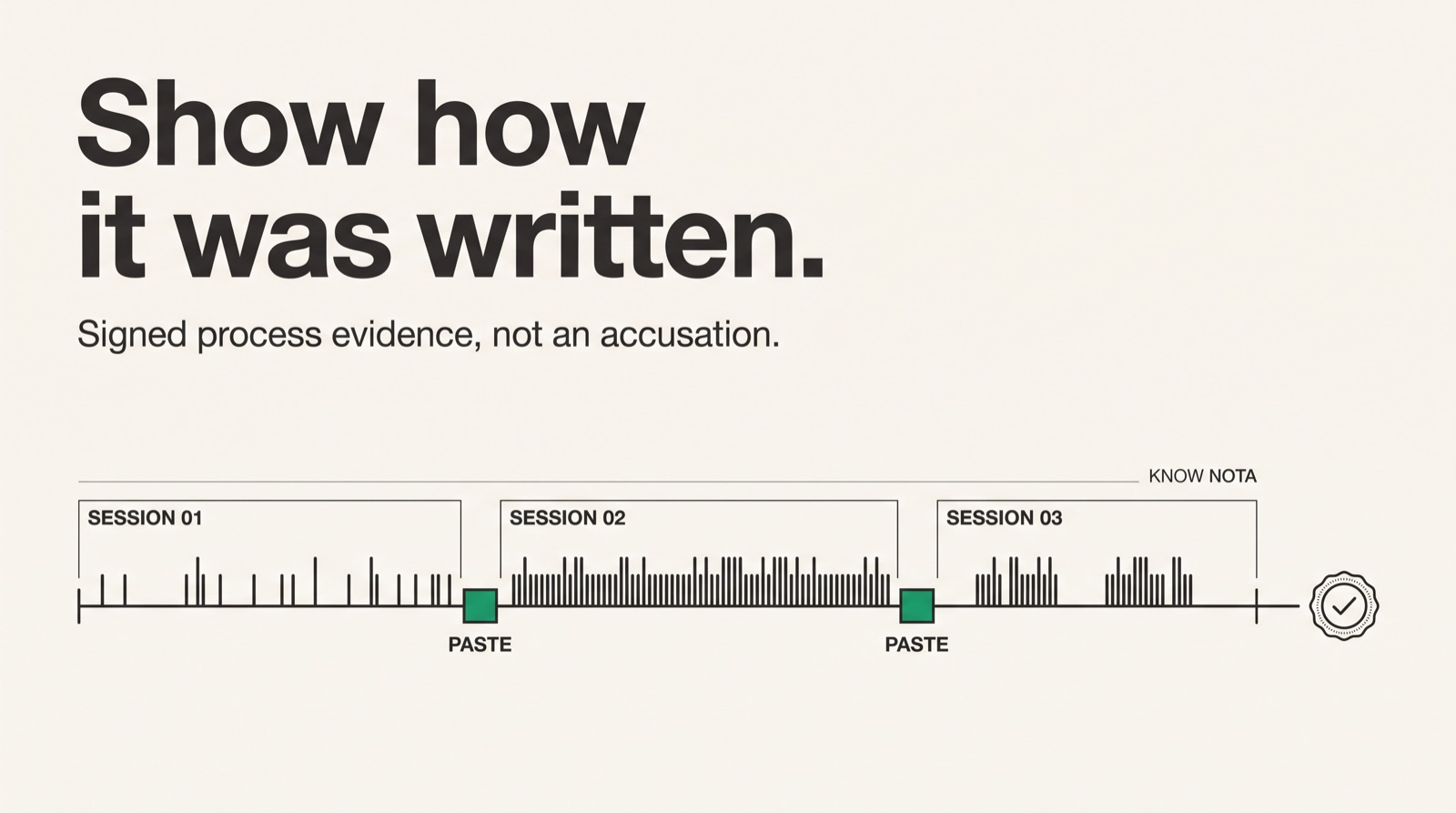
The record captures the writing process at the session level: when you wrote, for how long, how the document accumulated over time, what arrived at a typing pace, and what arrived in blocks — faster than anyone can type — rather than being typed. That output is then cryptographically signed and issued with a shareable verification link. Anyone — an instructor, an editor, an academic integrity panel — can open that link and see the record and confirm it hasn't been modified since it was signed. There's nothing to install on either side.
Two design decisions matter most for the situations described in this article.
It works after the fact. This is the practical difference from screen recording, and the mechanism is simple: the history is already inside the Google Doc, and Nota reads it — with your permission, for that one document — after the dispute has started. You do not need to have anticipated an accusation before you started writing. If you're already in a dispute over something you submitted, you can produce a record now. That's the single most common situation people arrive in: the essay is submitted, the flag has already gone out, and every piece of standard advice assumes preparation they didn't do.
Pastes are visible rather than invisible. Version history's blindness to provenance is what makes it easy to dismiss. A record that distinguishes typed composition from blocks that arrived faster than anyone can type — a paste, an import, or a move — and shows where and when they occurred, is a substantially more informative document, in both directions. If your process involved pasting in your own outline or a quoted source, the record shows that as pasting, and you can explain it. That's better than a record that hides it and invites suspicion.
What the record does not prove
We would rather lose a sale than overclaim here, because overclaiming is how tools like this get discredited.
A Know Nota record shows how a document was written and typed. It does not prove who was sitting at the keyboard. It cannot. No software-based record can establish physical identity, and any product telling you otherwise is selling you something it doesn't have. If someone dictated an AI-generated paragraph to a typist, or retyped chatbot output word by word, the record would show sustained human typing — because sustained human typing is what happened.
It is also not a legal instrument. It's not a notarization, it's not an affidavit, and it carries no automatic evidentiary weight in a formal proceeding. It's a signed, verifiable, tamper-evident description of a writing process. In an academic integrity conversation, that is usually a great deal more than either side currently has — but it's a contribution to a judgment, not a verdict.
What it does do, honestly stated: it converts "trust me" into "check this." That's the entire value proposition, and it's enough.
Practical guidance, depending on who you are
If you've been falsely accused by an AI detector right now: gather everything, in this order. Export your Google Docs version history and take timestamped screenshots. Collect drafts, notes, browser history for sources you consulted, and messages where you discussed the assignment. Create a Know Nota record so the process evidence is signed and verifiable rather than self-reported. Then write a short, non-defensive statement, and include the citations from the top of this article — particularly the Liang et al. study if English is not your first language, and Vanderbilt's published reasoning for disabling Turnitin's detector. Institutions respond very differently to "I didn't cheat" than to "here is my process record and here is the documented error rate of the tool that flagged me."
If you're an educator: the useful reframe is that you don't want an accusation tool, you want a non-accusatory one. Asking a student to share a writing record is a materially different conversation from confronting them with a detector percentage. It gives an honest student a way to resolve the matter in five minutes and gives you something concrete to reason about instead of a probability you can't audit.
If you're a professional writer: this is increasingly a client and publisher issue, not just an academic one. Editors are running submissions through Copyleaks and GPTZero, and a false positive on a paid assignment costs you the relationship. Producing a record alongside delivery is cheap insurance, and for anyone who writes clean, conventional, low-perplexity prose — which is what good technical and commercial writing often is — you're in exactly the category detectors misfire on.
Start with your own writing
If you're in a dispute, or you write in a context where you might be, the fastest way to understand what this evidence looks like is to generate one for something you've already written.
Create a signed writing record at Know Nota → Nothing to install, works on documents you've already finished, and produces a verification link you can hand to an instructor, editor, or review panel.
Check what it shows. Check what it doesn't. Then decide whether it's stronger than a version history screenshot.